Screenshots
Description
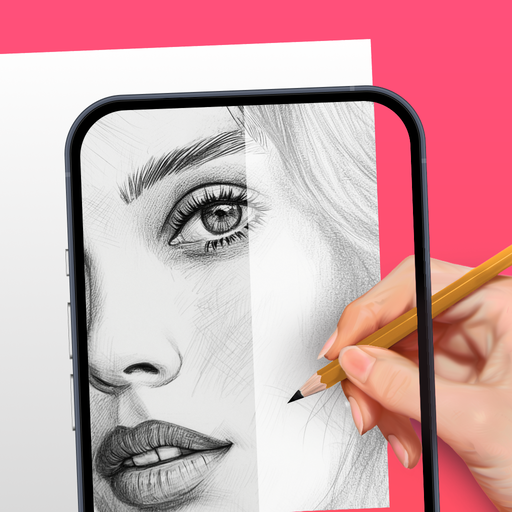
Been playing with AR Drawing: Sketch & Paint for a couple months now. It’s basically an app that lets you use your phone’s camera to trace pictures and then color them in. Pretty solid if you’re into drawing and art stuff.
Here’s what you do – you just point your camera at a surface, and the app projects a template image that you can trace. There’s also a built-in flashlight which is handy. And once you’ve got your sketch, you can start painting it with different colors and tools. You can even record a video of the whole process.
Look, if you’re into art and creativity apps, you’ll probably like this. It’s not perfect – the templates are a bit limited and the ads can get annoying. But overall it’s a fun way to make some cool drawings without having to be a master artist. Worth checking out if you want to get into digital art.
Editor Opinion
So here's my honest take on AR Drawing: Sketch & Paint. I've tested a bunch of drawing apps and this one's pretty solid. The AR tracing feature works surprisingly well and makes it easy to create decent-looking sketches, even if you're not super artistic. And the painting tools are basic but get the job done. I like that you can record your process - great for learning or sharing. On the downside, the selection of templates is a bit limited, and the frequent ads can get old. But for a free app, it's a pretty neat way to dive into digital art and drawing.

Pros & Cons
Pros
- Tracing AR templates makes drawing easy
- Good variety of templates to choose from
- Lets you record the drawing/painting process
- Free to use, don't have to pay anything
- Works well on older phones
Cons
- Templates are a bit limited in selection
- Ads can get annoying after a while
- Painting tools are basic, not a ton of control
- Upgrading features requires in-app purchases
Specifications
| Updated | 15.09.2025 |
| Category | Art And Design |
| Age Rating | Everyone |
| Developer | AR Drawing |
| Android | Android 8.0++ |
| Package Name |
ar.drawing.sketch.paint.trace.draw.picture.paper |
Ratings
User Reviews
actually I like it and it is good and it helps you to improve your drawings if you want to be an artist and I want to improve my drawing...
I hadn't even started the application yet.Opening at the very first time going through the initiation.Which is multiple questions ongoing?Still at this very moment and it asked me to rate...
I picked a picture from my gallery and selected 1 type of drawing mode it said only for pro so I picked the other type and it said only for...
Rate this app
Help others by rating key aspects of this app
App Permissions
This app requires 14 permissions to function properly:
Frequently Asked Questions
Similar Apps

Clip Studio Paint
teamLab
Magic Doodle: Glow Art Drawing
AI Art Generator: AI Picture
Trace Drawing-Sketch and Paint
AI Photo Generator – Umagic AI
AI Art Generator: Photo, Draw
Poster Maker & flyer maker app
AIreel :AI Video Generator

Logo Maker : AI Logo Generator
Ai Tattoo ldeas-Art Generator