Screenshots
Description
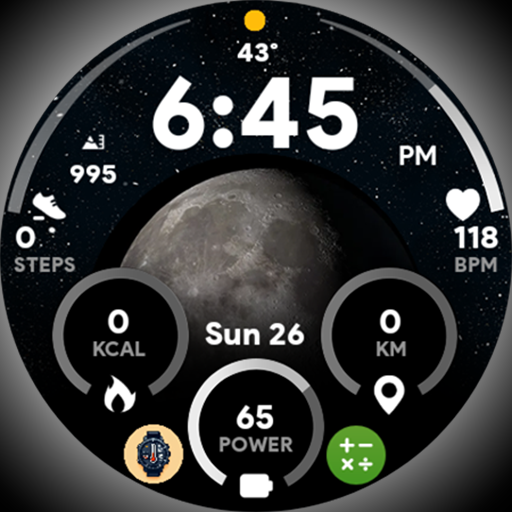
I’ve been using Moon Dial – Watch face for a couple months now. It’s basically a simple watch face that shows you the current moon phase. Pretty solid app if you’re into that kind of thing.
Here’s what you do: there’s a big moon icon that shows the current moon phase. And you can also turn on a starry night effect, which looks pretty cool. And there are 5 custom complications you can use to add extra info like battery, steps, and so on. Took me a bit to figure all that out but it’s pretty useful once you get the hang of it.
Look, if you’re into watch faces and want an easy way to check the moon phase, you’ll probably like this. It’s not perfect – the custom complications can be a bit buggy sometimes – but overall it does the job. Worth checking out if you’re a Wear OS user.
Editor Opinion
So here's my honest take on Moon Dial - Watch face. I've tested a bunch of watch face apps and this one's pretty solid. The moon phase feature is the main draw, and it works well. The starry night effect is a nice touch too. The custom complications are handy but can be a bit glitchy at times. Overall though, it's a nice little app that does what it promises. Not gonna blow you away, but it's worth grabbing if you want an easy moon phase tracker on your Wear OS watch.

Pros & Cons
Pros
- Big, easy-to-read moon phase indicator
- Starry night effect looks pretty cool
- Useful custom complications to add extra info
- Free to download and use
Cons
- Custom complications can be buggy at times
- Not a ton of customization options
- Gets a bit repetitive after a while
Specifications
| Updated | 14.03.2025 |
| Category | Lifestyle |
| Age Rating | Everyone |
| Developer | SP Watches |
| Package Name |
com.spwatches.moondial |
Ratings
User Reviews
Can only manipulate 2 of the 5 complications. Pretty rude response from a developer whose product doesn't work as well.
Rate this app
Help others by rating key aspects of this app
Frequently Asked Questions
Similar Apps

Ghostalker

DailyGift: Earn Reward

Asana Rebel: Get in Shape

Nebula: Horoscope & Astrology

myPurina – Pet Rewards & Care

Fieldy – AI note taker


Nintendo Today!
Color Widgets, Theme: iWidgets


CashLand: Earn Rewards & Play

Liven: Discover yourself
More from SP Watches
Digital Weather 2 – Watch face
Weather
Pixel Paradise – Watch face
Lifestyle
Broken Dial – Watch face
Lifestyle
Halloween Dial 2 – Watch face
Lifestyle
Pixel Weather 2 – Watch face