Screenshots
Description
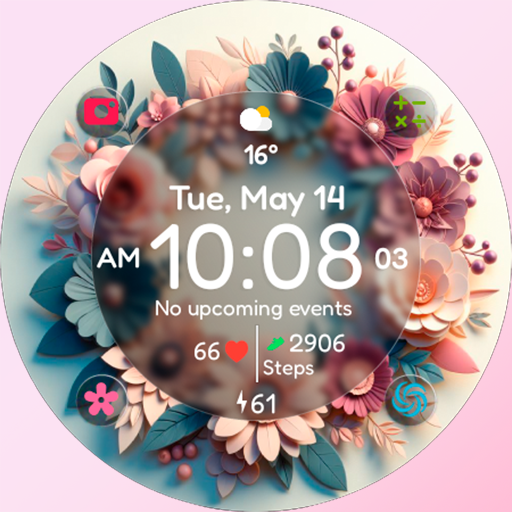
I’ve been using Chester Flower time for a couple months now. It’s basically a customizable watch face app for Wear OS. Pretty solid if you’re into that sort of thing.
Here’s what you can do – you can pick from a bunch of different styles and colors for the time display. And there’s also complications to show stuff like battery, date, and weather. And you can mess with the background too – there’s a few different options. Took me a while to figure out all the customization but it’s pretty cool once you get the hang of it.
Look, if you’re into personalized watch faces, you’ll probably like this. It’s not perfect – the AOD mode could be better and the installation process is a bit tricky – but overall it does the job. Worth checking out if you want to pimp out your Wear OS smartwatch.
Editor Opinion
So here's my take on Chester Flower time. I've tried a bunch of different watch face apps and this one stands out with its extensive customization options. And the style choices are great and it's easy to make the watch face your own. On the downside, the installation can be a pain if you're not tech-savvy, and some of the features like the AOD mode feel a bit half-baked. But overall, it's a pretty solid option if you want a unique, personalized look for your smartwatch.

Pros & Cons
Pros
- Tons of style options to customize the look
- Useful complications like battery, date, and weather
- Free to download and use
- Runs smoothly on my Wear OS device
Cons
- Installation process is a bit tricky if you're not familiar with it
- AOD mode could be better
- Gets a little repetitive after a while
Specifications
| Updated | 20.07.2025 |
| Category | Personalization |
| Age Rating | Everyone |
| Developer | CHESTER WATCH FACES |
| Package Name |
com.watchfacestudio.chesterflowertime |
Ratings
Rate this app
Help others by rating key aspects of this app
Frequently Asked Questions
Similar Apps
Halloween Animated Watch 084
USB Screen Share – Phone to TV
GUERILLA – Analog watch face
Digital Tree v3 Watch Face
Key WF93 Halloween Watch Face
Personalization
Material You Widgets

Comics Icon Pack
MD242 Hybrid watch face
Bow Wallpaper Cute Backgrounds
Battery Charging Animation App

OneLiquid – Icon Pack